
In the case of a forgotten password, follow the steps below!

2. Enter your agency email in the “email” field.
3. Click “Send me reset password instructions”

4. Navigate to your email inbox.
5. Locate an email from “Housing Forward CAS” with the subject line “Reset Password Instructions”. Be sure to check your spam folder!
6. In the email click the “Change my password” link.

7. Once you click the above link, this temporary password screen will open up in a new
browser. Create a new password that you will remember and save it somewhere secure should you need to access it. Click “Change my password”.

8. Clicking “Change my password” will take you to a confirmation page confirming that your password has been changed and that you are signed in!

Green River CAS allows providers to decline a match for the following reasons:
The reason “other” should only be used in extenuating circumstances and after confirming with the Housing Forward CAS team that the reason is acceptable.
This feature allows the provider to send the match back to the CAS Administrator who can then make a more appropriate match or close the match if the client is no longer in need of housing.
You can Decline for an acceptable (listed) reason any time you see the Decline option on the match page.

Q: What if I do not see the reason I need to decline my client listed?
A: Check the Park reasons and consider whether you need to Decline or Park the client. If you do not see any reason listed that relates to your client’s situation, submit the Decline with reason “Other” and provide details if possible. This option should only be used as a last resort, and should not be used to circumvent federal and local policies and procedures regarding acceptable reasons to reject a referral through our community’s Coordinated Access System.
Green River CAS allows us to “park” a client matched to a route. Parking the client has the following effect:
This feature allows us to essentially press “pause” on a client’s match. When the park ends, the client is able to be re-matched and pick up where they left off in the process.
In short, providers should park the client in the case that the client cannot be immediate served due to reasons, including but not limited to:
There are a few other less common reasons for parking. All acceptable reasons to park a client are listed on the Park form in Green River. The reason “other” should only be used in extenuating circumstances and after confirming with the Housing Forward CAS team that the reason is acceptable.
You can Park for an acceptable (listed) reason any time you see the Park option on the match page.
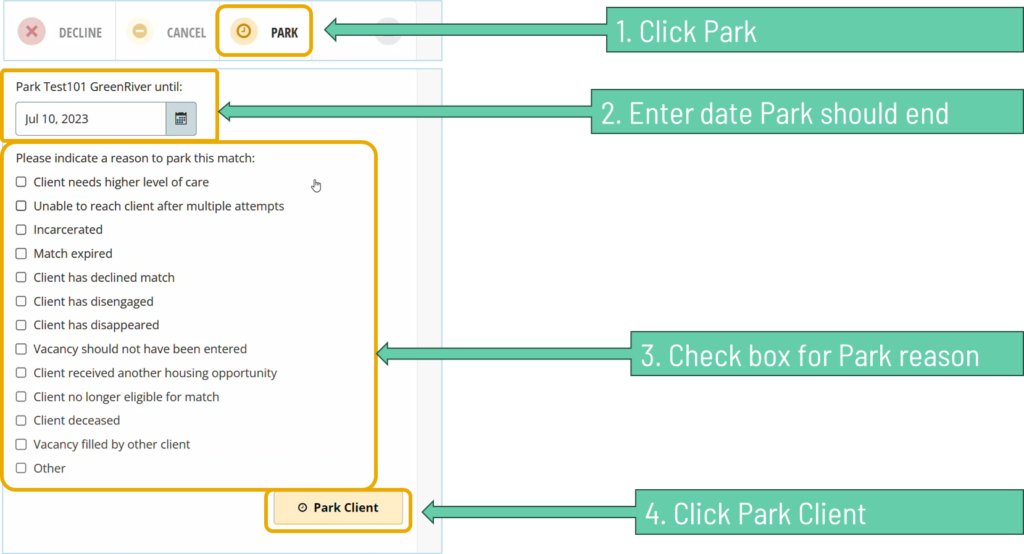
Q: How do I determine the date the park should end?
A: If the client is being parked for a reason that has a natural ending date, such as a short-term incarceration, list the natural ending date of the event. If a client is being parked for an indefinite reason, such as being deceased or receiving another housing opportunity, leave the date blank if possible. If the system will not allow you to leave the date blank, you can enter 1 year from the current date. For clients who have disengaged or disappeared, choose a date 30 days from the current date.
Q: What if I do not see the reason I need to park my client listed?
A: Check the Decline reasons and consider whether you need to Park or Decline the client. If you do not see any reason listed that relates to your client’s situation, submit the Park with reason “Other” and provide details if possible. This option should only be used as a last resort, and should not be used to circumvent federal and local policies and procedures regarding acceptable reasons to reject a referral through our community’s Coordinated Access System.
Q: How many times can a neighbor be parked?
A: Our community does not currently have a limit to the number of times you can park a client. This feature allows our system to be flexible in meeting the needs of the neighbors we serve, and limiting parking would work against that goal.
Green River CAS will show that a match stalled when the time from when the match was sent to when the provider responds exceeds our community’s policy for responding to referrals. As of the date of publishing, our community’s policy asks providers to respond within 10 days.
When the match is about to be considered stalled, a notification will display under the match.

Once the match is stalled, a similar notification will appear stating the date the match stalled.
Program Managers/designated leads are responsible for responding to matches, including stalled matches. The response options will appear on the Match page once the match has stalled. Respond based on whether the client is engaging or not engaging with services and list the reason why the the match has stalled, or not yet been responded to (accepted or declined).


Q: What date do I enter for “client last seen” if the client cannot be contacted or located?
A: If you have made initial contact with the client since receiving the match, list the last date the client was contacted. If you were never able to make contact with the client upon receiving the match, list the referral/match date.
Q: Does due diligence still apply?
A: Yes. The use of Green River CAS to match, prioritize, and refer does not change or affect our community’s due diligence policies.

2. Upon receiving assignment email from Green River, the assigned Case Manager enrolls the client into HMIS, and continues successfully.
3. Case Manager enters voucher issuance date and PHA name into Green River.

4. Case Manager enters move in date in Green River and HMIS.

CoC Admin closes match.
2. When a voucher is secured, the date issued is recorded.

3. Upon the submission of the RFTA to PHA, Navigator checks box in Green River and clicks “Accept Match”.

This action notifies the CoC Admin to make EHV Case Manager referral. The CoC Admin assigns a Case Manager Agency Contact and the Case Manger takes over the workflow.