
You should submit a SpiceWorks help desk ticket anytime you need assistance regarding HMIS or from the HMIS Team. Doing so allows the Housing Forward staff to see that you have placed a request for help, allows us to prioritize all requests, and ensures your request is not overlooked.
The Help Desk email address is help@housingforward.on.spiceworks.com
We recommend you save this email address to the contacts for your email and create an email folder specifically for HMIS Help Desk Request emails.
Once your request is submitted, you will receive an email confirming your request has been received by the HMIS Team. We recommend that you create an email folder for HMIS Help Desk Requests and save all confirmation emails and replies. If you wish to follow-up on your ticket or provide additional information, simply reply to the saved email, and your reply is added to your ticket. We will reply to your ticket with updates until the issue is resolved, and these replies will come to you as an email reply.
CoC – SH Intake Form – HoH & Adults
CoC – SH Intake Form – Under 18
CoC & NOFOs – PSH Intake Form – HoH & Adults
CoC & NOFOs – PSH Intake Form – Under 18
CoC, ESG, ESG RUSH & NOFOs – DS HP SRO SSO TH Intake Form – HoH & Adults
CoC, ESG, ESG RUSH & NOFOs – DS HP SRO SSO TH Intake Form – Under 18
CoC, ESG, ESG RUSH & NOFOs – RRH Joint TH RRH (RRH) Intake Form – HoH & Adults
CoC, ESG, ESG RUSH & NOFOs – RRH Joint TH RRH (RRH) Intake Form – Under 18
CoC, ESG, ESG RUSH & NOFOs – TH Joint TH RRH (TH) Intake Form – HoH & Adults
CoC, ESG, ESG RUSH & NOFOs – TH Joint TH RRH (TH) Intake Form – Under 18
CoC, ESG, ESG-RUSH & NOFOs – SO Intake Form – HoH & Adults
CoC, ESG, ESG-RUSH & NOFOs – SO Intake Form – Under 18
ESG, ESG-RUSH & NOFOs – ES NBN Intake Form – HoH & Adults
ESG, ESG-RUSH & NOFOs – ES NBN Intake Form – Under 18
RHY – BCP EE Intake Form – Child of Parenting Youth
RHY – BCP EE Intake Form – HoH & Adults
RHY – BCP Prev Intake Form – Child of Parenting Youth
RHY – BCP Prev Intake Form – HoH & Adults
RHY – MGP TLP Intake Form – Children of Parenting Youth
RHY – MGP TLP Intake Form – HoH & Adults
RHY – SO Intake Form – Child of Parenting Youth
RHY – SO Intake Form – HoH & Adults
GPD – BH CT HH SITH TIP Intake Form – HoH & Adults
GPD – BH CT HH SITH TIP Intake Form – Under 18
GPD – CMHR Intake Form – HoH & Adults
GPD – CMHR Intake Form – Under 18
GPD – LD Intake Form – HoH & Adults
GPD – LD Intake Form – Under 18
HCHV HCHV CRS – LDSH EH Intake Form – HoH & Adults
HCHV HCHV CRS – LDSH EH Intake Form – Under 18
HUD VASH – CCM Intake Form – HoH & Adults
HUD VASH – CCM Intake Form – Under 18
HUD VASH – Intake Form – HoH & Adults
HUD VASH – Intake Form – Under 18
SSVF – Prev Intake Form – HoH & Adults
SSVF – Prev Intake Form – Under 18
SSVF – RRH Intake Form – HoH & Adults
SSVF – RRH Intake Form – Under 18
YHDP – PSH RRH Joint TH RRH Intake Form – Child of Parenting Youth
YHDP – PSH RRH Joint TH RRH Intake Form – HoH & Adults
YHDP – SO Intake Form – Child of Parenting Youth
YHDP – SO Intake Form – HoH & Adults
YHDP – SSO Intake Form – Child of Parenting Youth
YHDP – SSO Intake Form – HoH & Adults
YHDP – TH Intake Form – Child of Parenting Youth
YHDP – TH Intake Form – HoH & Adults
CLIENT SETTINGS
FAMILY SETTINGS
Remove a family member from a family and enrollment
MANAGING YOUR ACCOUNT
Forgot Password – Resetting Your Password
POINT IN TIME ASSESSMENTS
Current Living Situation with Geocode
Create an Update or Annual Assessment
Editing an Assessment – Updates vs. Edits
REPORTS
SERVICES
Quick Services for Multiple Clients
DATA QUALITY
This document was developed by the HMIS Committee for our community to determine how we will approach Data Quality. You can view the document below or download it for your own reference.
Each Partner Agency will designate an Data Quality Officer. The Data Quality Officer is the primary contact for all communication regarding data quality for the Dallas / Collin County CoC Data Systems Project at this agency.
Note: This table updates in real time and shows the most current submissions for Data Quality Officer, regardless of the “updated on” date listed above.
As the Homeless Management Information System (HMIS) Lead, we aim to facilitate a comprehensive, standardized data collection process across homeless service providers. To achieve this, we request annual project profiles from agencies involved in both HMIS-participating and non-HMIS-participating projects. This initiative is pivotal in aligning project data with HMIS Data Standards, enabling the seamless integration of information, and ensuring accurate reporting to meet the requirements set forth by the Department of Housing and Urban Development (HUD).
The online Project Profile Form serves as a crucial tool in our endeavor to streamline data management within the HMIS framework. Its completion is instrumental in standardizing data collection, meeting HMIS Data Standards compliance, efficient HMIS project setup, and CoC reporting requirements.
By requesting agencies to submit project profiles annually through this online form, we ensure that the HMIS operates as a robust and reliable platform for managing homeless services data. The collected information not only fulfills mandatory reporting obligations but also contributes to a more comprehensive understanding of homelessness, enabling targeted interventions and improved outcomes for individuals experiencing homelessness.
Please contact Housing Forward at Help@on.SpiceWorks.com if you require assistance completing this form.
Agencies who enter data into HMIS are required to post this notice in English and Spanish in every room/area that where client data is collected. You can download and print the document below.
Remember, client consent is not required to enter data in HMIS. If a client requests more information, you should provide them with a printed copy of the Housing Forward’s Privacy Policy. All required questions should be asked regardless of whether or not the client wants their data entered in the system. “Client Refused” is an appropriate answer to any question that a client refuses to answer because they do not want their data collected.
For sensitive organizations only:
While sensitive organizations are not required to get clients’ consent to enter data, you are required to get consent to share the data. Complete the Client Consent and Release of Information for each client who agrees to share their data in HMIS. If you are unsure if your organization is a sensitive organization, submit a Spiceworks ticket to the HMIS team for assistance.
Agencies who enter data into HMIS are required to post this notice in English and Spanish in every room/area that where client data is collected.
Remember, client consent is not required to enter data in HMIS. If a client requests more information, you should provide them with a printed copy of the MDHA Privacy Policy. All required questions should be asked regardless of whether or not the client wants their data entered in the system. “Client Refused” is an appropriate answer to any question that a client refuses to answer because they do not want their data collected.
For sensitive organizations only:
While sensitive organizations are not required to get clients’ consent to enter data, you are required to get consent to share the data. Complete the Client Consent and Release of Information for each client who agrees to share their data in HMIS. If you are unsure if your organization is a sensitive organization, submit a Spiceworks ticket to the HMIS team for assistance.
Please complete the form in its entirety in order to set up or make changes to program services in HMIS.
Our HMIS User Agreement is now digital! Please use the form below to sign and submit your User Agreement as needed.
The Housing Forward Data Administrators may request a new or updated User Agreement when:
This privacy policy is a detailed policy for clients’ whose data is entered in HMIS. It explains why the data is collected and how it is used by our community. Agencies should keep several copies of this policy on hand so that it can be provided to clients upon request.
NOTE: Remember, client consent is not required to enter data in HMIS. All required questions should be asked regardless of whether or not the client wants their data entered in the system. “Client Refused” is an appropriate answer to any question that a client refuses to answer because they do not want their data collected.
This document details the agreement that MDHA and partner agencies enter into when an agency becomes an HMIS-participating partner.
Agencies working with the HMIS Team to submit documentation for HMIS onboarding should download this form, complete it, and return it to Freda Nelms.
If you are interested in becoming an HMIS-participating agency, please contact Freda Nelms, Director of Data Management and Reporting, at freda.nelms@housingforwardntx.org for more information.
Click on the button below to complete your Security Officer Agreement.
This document was developed by the HMIS Committee for our community to determine how we will approach Data Quality. You can view the document below or download it for your own reference.

2. Under the “HMIS Reports” dropdown, select “HMIS Data Entry Timing Report”

3. On the reporting screen: select Date Range, Type, Organization, and Program(s)


Note: The “Programs” field is multi-select!
4. Once the required information is captured, select “Report“

If the reports are running in the background, you’ll see the notifications below.


5. When the report is ready, you will see something like the one below. By clicking on the plus signs, you will be able to see client-level data.

6. To save the report, select the “Save” icon and choose “Excel“. This will save the report in the same formatting you are seeing it in ClientTrack!

Data Quality Monitoring takes place on a quarterly basis. The submission form opens on the first day of the month following the end of each quarter and remains open for the entirety of that month to allow time for data clean up.
Data Quality Officers run a series of reports that provide them with a full picture of their organization’s data quality. Reports are always run from the first of the year through the end of the preceding quarter. They then resolve any data clean up issues that they can before submitting their reports and answering a few questions on the submission form. Detailed instructions for each report can be found in the HMIS Quarterly Reporting Submission Guide.
Data Quality Office Hours are held on the second Tuesday following the end of the quarter at 10:00am. During these office hours, we discuss any changes to the submission process for that quarter, as well as provide technical assistance and answer questions from DQOs.
Reporting Schedule:
| End of Quarter | Submission Opens | DQO Office Hours | Submission Closes |
| March 31 | April 1 | 2nd Tuesday of April | April 30 |
| June 30 | July 1 | 2nd Tuesday of July | July 31 |
| September 30 | October 1 | 2nd Tuesday of Oct. | October 31 |
| December 31 | January 1 | 2nd Tuesday of Jan. | January 31 |
If you are the designated Data Quality Officer for your organization and you have access to ClientTrack, you can access the DQO Workgroup by opening your Account Settings and choosing the following:
This workgroup will give you access to the following additional features. Scroll down this page to learn more about each one.
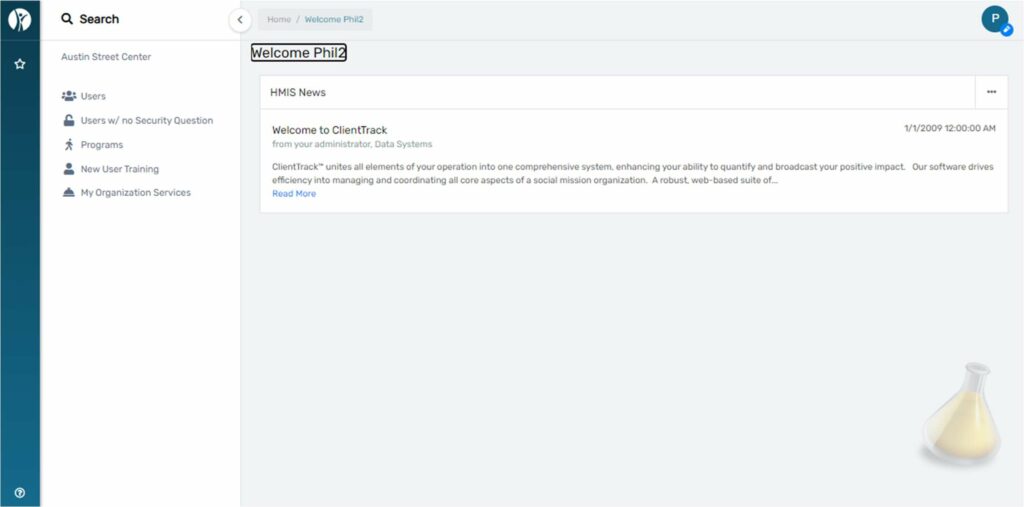
The dashboard of the DQO workgroup shows HMIS News. Check here for updates from your HMIS Admins:
The Users page shows all users for your organization. You can filter by Active, Inactive, and Pending:
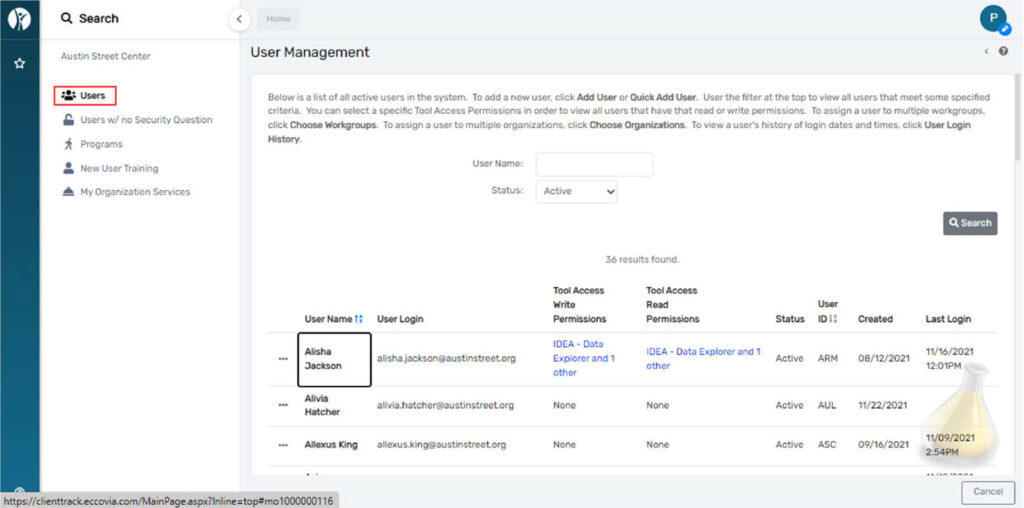
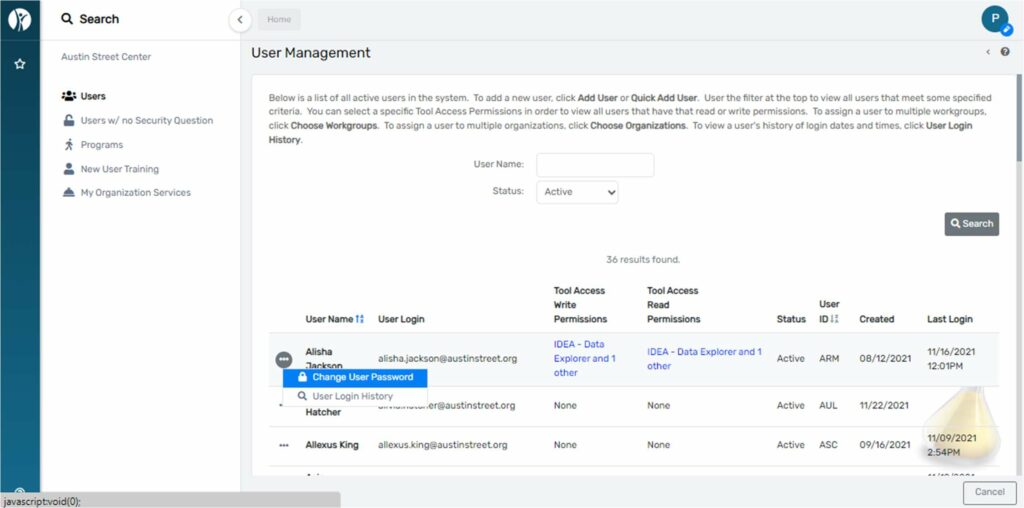
The action button to the left of each user will give you options to see user login history and update the user’s password:
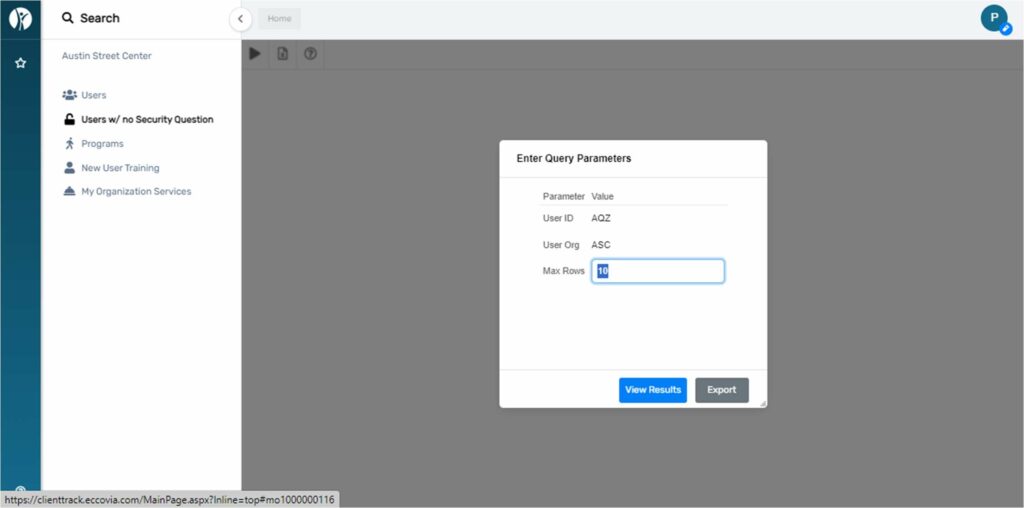
The Users w/ no Security Question page will populate a query that shows all users within your org who have not set their security question:
Programs will show by default all active HMIS programs in your organization. You can also see all programs regardless of active status and all programs regardless of their participation in HMIS :
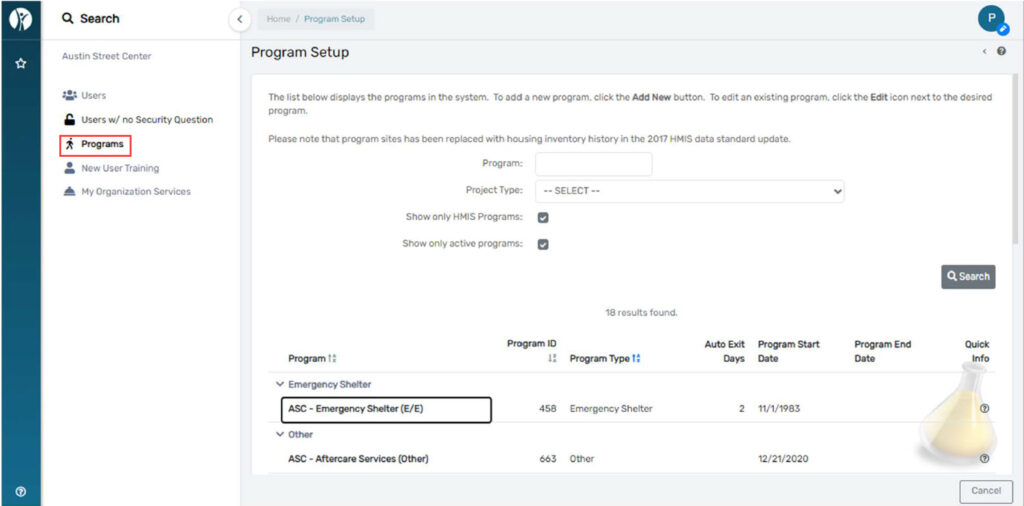
Please notify us if any programs listed under the active list should be ended.
My Organization Services will list services created by your organization. You can filter by Client ID, Service,
Service Date, and the user who created the service:
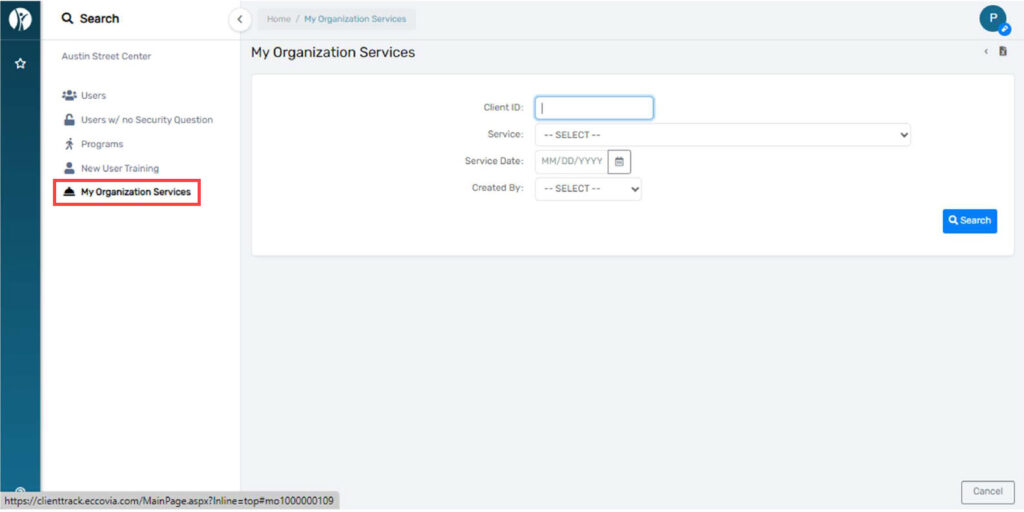
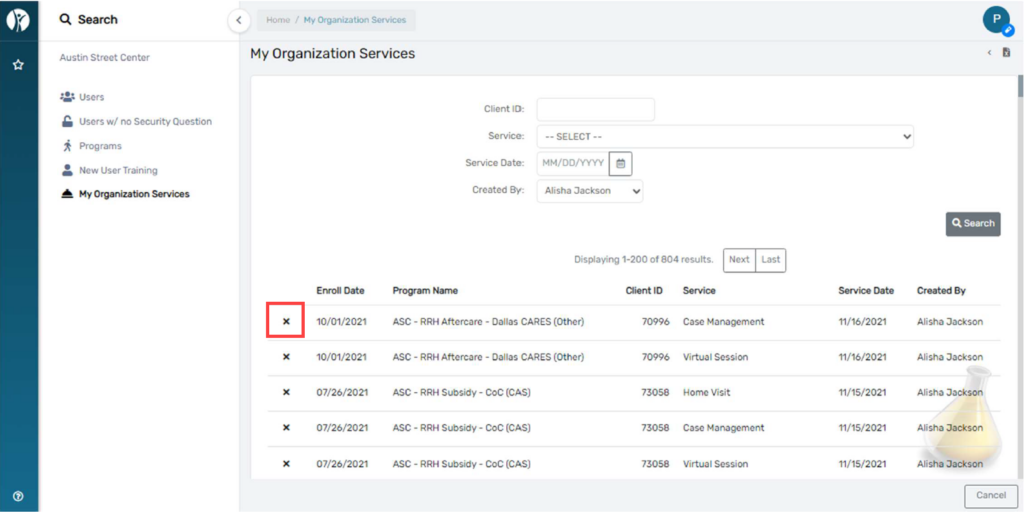
Filtering only by user will list all services created by the user. Click the “X” next to any service to delete it:
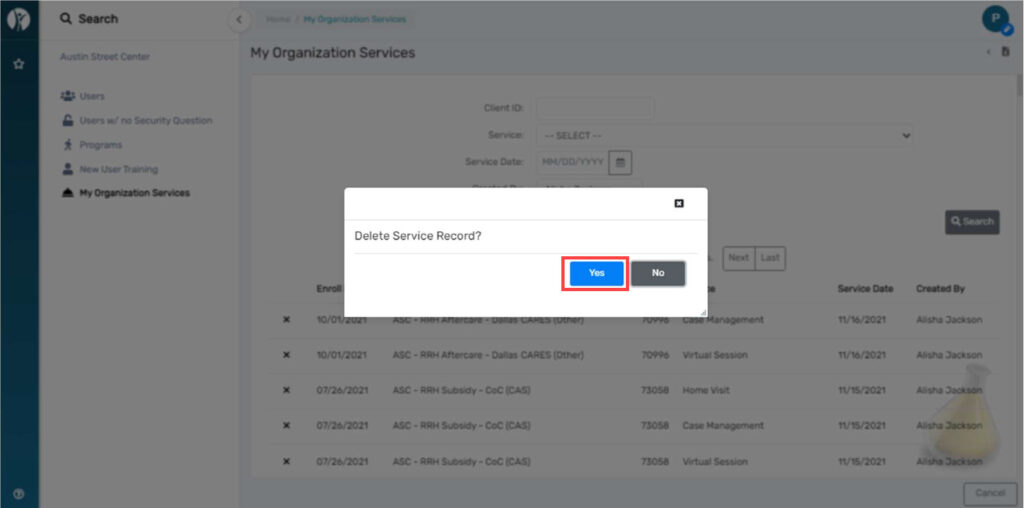
To confirm the deletion of the service click “yes” to confirm via the pop-up:
Paused Operations Report will show paused workflows for all users for your organization:
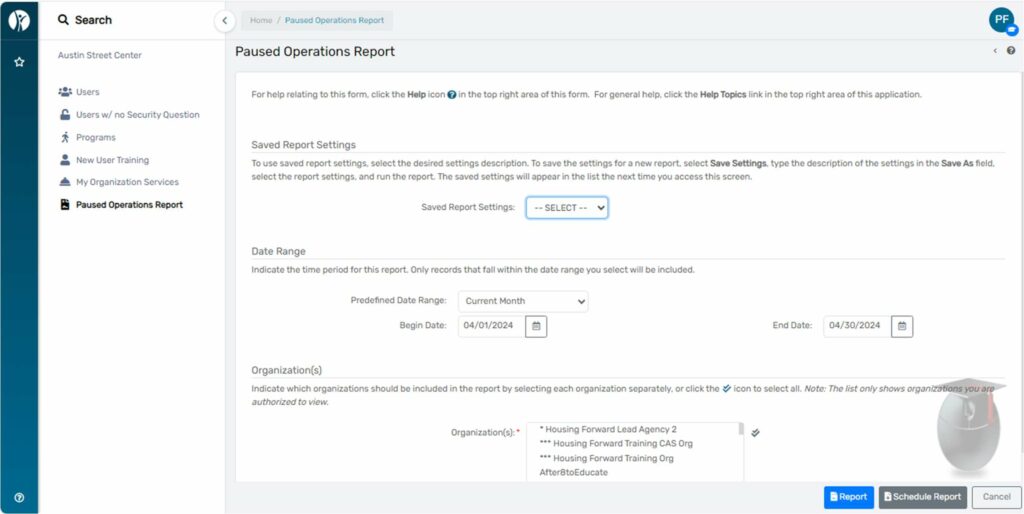
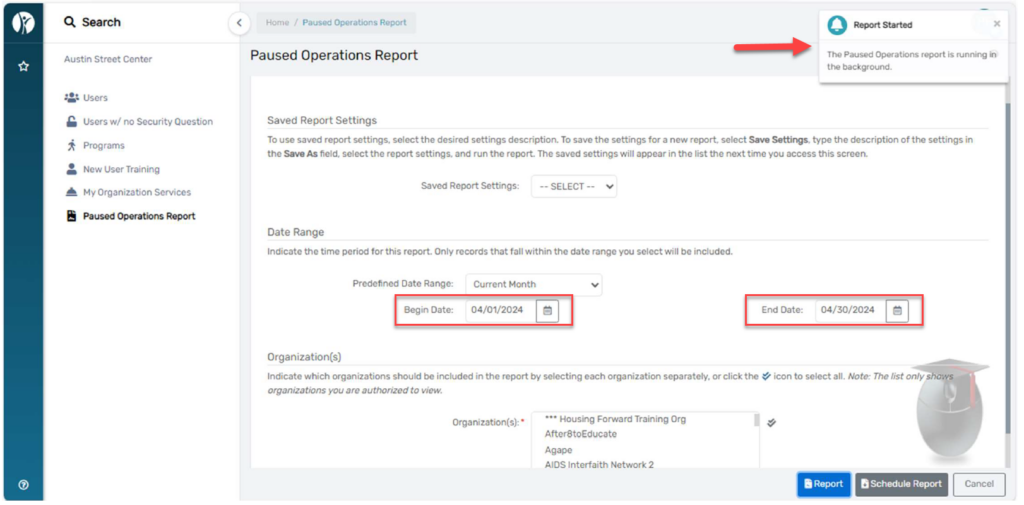
Enter your date range and click Report. You’ll see a notification on the top right of your screen that your
report is running:
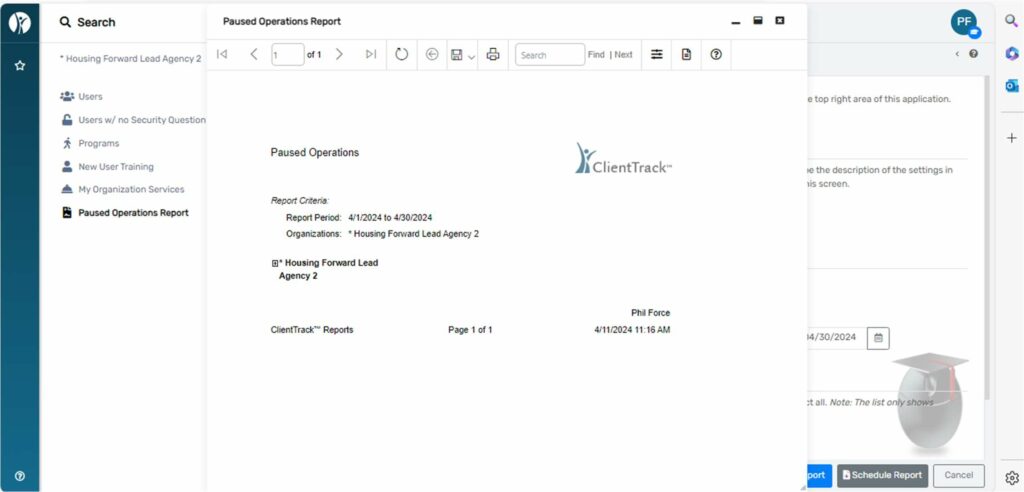
When this is done you will see a pop-up like the one below:
HMIS Quarterly Reporting Guide 9.21.26
Powered By EmbedPress
This report is a custom report that is built in Data Explorer which allows you to easily report on how often users at your agency are logging into ClientTrack.
The report will display the following data points:
• Active Status
• User ID
• User Name
• Email
• Organization Last Logged on to
• User Created Date
• Last Login Date
• Workgroup Last Logged in to
1. Log in to ClientTrack and navigate to your Reports Workspace.
2. In the menu, select Data Explorer.

3. Uncheck “Only show my questions”.

4. Search for “User Tracker” and select that query.

5. Under “Which records do you want to include?” change the organization to your agency.

6. Click “Show Me” then use the export button in the top right corner of the report to export your report.

Download document:

No. SNAP benefits are considered “non-cash benefits” and should be entered in the Non-Cash Benefits section of the financial assessment page titled “Income & Non-Cash Benefits”.
For more information on Data Element 4.03 Non-Cash Benefits please see the HMIS Data Standards Manual
No. Parkland health coverage is not true “insurance” and should not be listed as health insurance in any HMIS assessment (entry, update, annual, or exit).
For more information on Data Element 4.04 Health Insurance see the HMIS Data Standards Manual
No. In testing, we have found that services tied to an enrollment stayed on the client’s record even after an enrollment has been deleted.
If you delete and enrollment and also need services need to be deleted, please list the services that need to be deleted in the Spiceworks ticket requesting the deletion of the enrollment.
If you delete an enrollment and find that services have also been deleted, please submit a Spiceworks ticket to inform the HMIS Team of the error.
Clients should only be re-enrolled when the exit was done in error within the past 90 days.
Clients should have a new enrollment if they indeed left the program (for any length of time) and were readmitted. This allows each stay to be reflected accurately in the system.
April 2026 DQO Office Hours Presentation
Please watch the video and follow instructions included.
If you have any questions, please submit a help desk ticket to help@housingforward.on.spiceworks.com
July 2026 DQO Office Hours Presentation
If you have any questions, please submit a help desk ticket to help@housingforward.on.spiceworks.com
Please watch the video and follow instructions included.
If you have any questions, please submit a help desk ticket to help@housingforward.on.spiceworks.com
Please watch the video and follow instructions included.
If you have any questions, please submit a help desk ticket to help@housingforward.on.spiceworks.com
Please watch the video and follow instructions included.
If you have any questions, please submit a help desk ticket to help@housingforward.on.spiceworks.com
Please watch the video and follow instructions included.
If you have any questions, please submit a help desk ticket to help@housingforward.on.spiceworks.com
If you have any questions, please submit a help desk ticket to help@housingforward.on.spiceworks.com
Please watch the video and follow instructions included.
If you have any questions, please submit a help desk ticket to help@housingforward.on.spiceworks.com
Please watch the video and follow instructions included.
If you have any questions, please submit a help desk ticket to help@housingforward.on.spiceworks.com
Please watch the video and follow instructions included.
If you have any questions, please submit a help desk ticket to help@housingforward.on.spiceworks.com
Please watch the video and follow instructions included.
If you have any questions, please submit a help desk ticket to help@housingforward.on.spiceworks.com
Data Collection information in this guide is taken directly from CoC Program HMIS Manual released by the U.S. Department of Housing and Urban Development (HUD). Housing Forward Staff has added screenshots of ClientTrack HMIS and guidance specific to our HMIS data entry for the program-specific data elements required for CoC programs.
Data Collection information in this guide is taken directly from ESG Program HMIS Manual released by the U.S. Department of Housing and Urban Development (HUD). Housing Forward Staff has added screenshots of ClientTrack HMIS and guidance specific to our HMIS data entry for the program-specific data elements required for ESG programs.
Information in this guide is taken directly from the HOPWA Programs HMIS Manual provided by the U.S. Department of Housing and Urban Development (HUD). Housing Forward Staff has added screenshots of ClientTrack HMIS and guidance specific to our HMIS data entry for the program-specific data elements required for HOPWA programs.
Data Collection information in this guide is taken directly from HUD-VASH Program HMIS Manual released by the U.S. Department of Housing and Urban Development (HUD). Housing Forward Staff has added screenshots of ClientTrack HMIS and guidance specific to our HMIS data entry for the program-specific data elements required for HUD-VASH programs.
Information in this guide is taken directly from PATH Program HMIS Manual released by the U.S. Department of Housing and Urban Development (HUD). Housing Forward Staff has added screenshots of ClientTrack HMIS and guidance specific to our HMIS data entry for the program-specific data elements required by SAMHSA for PATH programs.
Data Collection information in this guide is taken directly from RHY Program HMIS Manual released by the U.S. Department of Housing and Urban Development (HUD). Housing Forward Staff has added screenshots of ClientTrack HMIS and guidance specific to our HMIS data entry for the program-specific data elements required for RHY programs.
Information in this guide is taken directly from the VA Data Guide provided by the U.S. Department of Veteran’s Affairs. Housing Forward Staff has added screenshots of ClientTrack HMIS and guidance specific to our HMIS data entry for the program-specific data elements required by the VA for various programs.
Data Collection information in this guide is taken directly from YHDP Program HMIS Manual released by the U.S. Department of Housing and Urban Development (HUD). Housing Forward Staff has added screenshots of ClientTrack HMIS and guidance specific to our HMIS data entry for the program-specific data elements required for YHDP programs.